help center
  • Introduction
  • Designs

    • Products
    • Design guides
    • Editing designs
    • Personalize (variables)
    • QR codes
    • Branded Links
    • Images
    • Fonts
    • Scaling text
    • Emojis
    • Finishes
    • Colours
    • Coupons
  • Testing

    • API

      • API Documentation
      • Authentication and API Keys
      • Example JSON
      • API status codes
      • Address Validation
      • Rate Limiting
      • Idempotency
      • Postman settings
      • CSV automation
      • Webhooks
    • Integrations

      • ActiveCampaign
      • Deployteq
      • HubSpot
      • Klaviyo
      • Laravel
      • Monday
      • Power Automate
      • Shopify
      • AFAS
      • Spotler / Squeezely
      • Zapier
      • Salesforce
      • Microsoft Dynamics 365
      • Odoo CRM
      • Copernica
      • Zoho
    • Mailing

      • Submission
      • Destinations
      • Sustainability
      • Batch
    • Billing

      • Invoice
      • Cost centers
    • Support

    help center

    English
    • Nederlands
    • English
    • Introduction
    • Designs

      • Products
      • Design guides
      • Editing designs
      • Personalize (variables)
      • QR codes
      • Branded Links
      • Images
      • Fonts
      • Scaling text
      • Emojis
      • Finishes
      • Colours
      • Coupons
    • Testing

      • API

        • API Documentation
        • Authentication and API Keys
        • Example JSON
        • API status codes
        • Address Validation
        • Rate Limiting
        • Idempotency
        • Postman settings
        • CSV automation
        • Webhooks
      • Integrations

        • ActiveCampaign
        • Deployteq
        • HubSpot
        • Klaviyo
        • Laravel
        • Monday
        • Power Automate
        • Shopify
        • AFAS
        • Spotler / Squeezely
        • Zapier
        • Salesforce
        • Microsoft Dynamics 365
        • Odoo CRM
        • Copernica
        • Zoho
      • Mailing

        • Submission
        • Destinations
        • Sustainability
        • Batch
      • Billing

        • Invoice
        • Cost centers
      • Support

      Print.one

      • Print.one website

      • Print.one login

      • Terms and Conditions

      Copyright © 2026 Print One. All rights reserved.

      • Mailing
      • Csv import
      • Using a Microsoft Excel document

      Csv import

      Using a Microsoft Excel document

      To use a Microsoft Excel document with our CSV import function, you have to convert it to a CSV using the following steps:

      1. Make sure you have headers

      Make sure you have headers in your Excel document. Headers are titles for your columns. They will help you identify what column is what, and are required for the mapping step of our function.
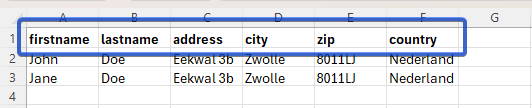
      image.png

      2. Save your Excel Document as a CSV

      To save your Excel Document as a CSV, follow along with the following video:

      3. Use your newly made CSV in our import flow

      With this newly made CSV file, you can follow the normal CSV import flow, now with your CSV file.

      Previous

      « Cost centers

      • Using a Microsoft Excel document